A developer could not connect to the Remedy server. The client sat there and eventually gave up, and the server said nothing useful - it reported itself as busy and carried on. Nobody had a way to prove what had happened, which meant the conversation went the way those conversations always go: the network team said it was the application, the application team said it was the network, and the user opened a second ticket.
The evidence was already being written to disk. We just were not reading it.
What the log actually showed
Two lines from arexception.log, from the incident:
/* Tue Mar 22 2016 14:54:45.7690 */
+GSI ARGetServerInfo -- as user lst from Developer Studio (protocol 20)
    at IP address 10.119.200.109 // :q:124.9s

/* Tue Mar 22 2016 14:54:45.7691 */
-GSI FAIL -- RPC Client has timed out
Read them together and the picture is complete. A named user, from a named tool, at a known address, made one API call. It sat in the queue for 124.9 seconds - that is the :q: value - and then the client gave up before the server finished. The server was not down. It was not refusing connections. It was working through a queue that had grown long enough that a human stopped waiting.
That single number ends the argument. It is not a network problem.
Turning it on
Exception logging arrived in AR System 8.1 Service Pack 2 and is off by default. Two settings, both on the Administration Server form:
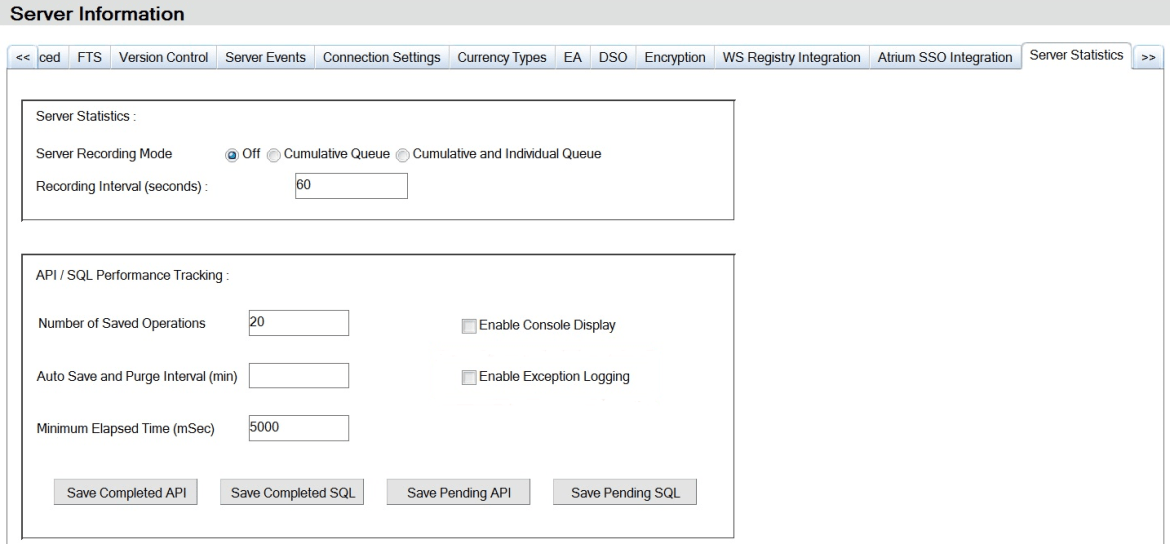
- Enable Exception Logging, on the Server Statistics tab, under API/SQL Performance Tracking. This is what produces
arexception.log. - Client Timeout, on the Server Events tab. This raises a server event when a call outlives its client, which is what makes the timeout reachable from workflow rather than only from a log file.
Two related settings decide how much you collect. The Server Recording Mode chooses between nothing, cumulative queue statistics only, or cumulative plus a separate entry per queue. Per-queue is the one worth having - a queue that is fine on average and terrible on one thread looks healthy in the cumulative view. The Recording Interval defaults to 60 seconds, and on a server that is already struggling, shortening it is not free.
The part BMC leaves to you
The client timeout event exists. The workflow that does something with it does not - AR System ships no filter for this, and the feature comes with no form workflow attached. Until an administrator writes it, the event fires into nothing.
What is worth writing is smaller than it first appears. The event form is built for notification: the fields are already shaped for use in a qualification and as substitution parameters in the message body. A filter on the client timeout event, qualified on the queue time exceeding whatever you consider unacceptable, notifying the administrator and optionally the affected user, is an afternoon's work.
The reason to bother is that it changes who finds out first. Without it you learn about timeouts when somebody complains, which means you learn about the ones that annoyed a person and never hear about the ones that quietly failed a scheduled integration.
What we use it for
Three things, in order of how often they earn their keep.
Settling the network argument. A queue time in the log is not open to interpretation. Either the server held the call or it did not.
Watching Mid Tier users without instrumenting Mid Tier. The timeouts show up server-side with the originating address, so you get a view of what your users are actually experiencing without deploying anything to the client or writing a line of custom code.
Catching degradation before it becomes an incident. Queue times creep. A server that occasionally touches 20 seconds this month is the same server that produces a full outage next quarter, and the log is where that trend is visible first.
One caution
Exception logging writes on the server that is already slow enough to be timing out. On a healthy system the cost is negligible; on one that is genuinely saturated, turning on per-queue recording at a short interval adds load exactly where you can least afford it. Turn it on, take the measurement, and decide deliberately whether it stays on permanently.
The mechanism and the field-level detail are documented by BMC under AR System server events and exception logging; what is above is how we use it on the systems we look after.
If you have a Remedy environment where timeouts get blamed on the network and nobody can prove otherwise, tell us what you are seeing.